OAuth is an open standard for authorization, widely adopted around the world. Its current version is 2.0.
OAuth (Open Authorization) is an open standard that allows third-party websites, with the user’s consent, to access information the user has stored at a service provider. This kind of authorization is achieved without the user having to share their username and password with the third-party site. Instead, OAuth lets the user hand a token to the third-party site; each token is bound to a specific third-party site, and it can only access specific resources within a specific time window.

This article gives a concise and approachable explanation of the design rationale and operating flow of OAuth 2.0. The primary reference is RFC 6749.

1. Application Scenario

To understand where OAuth applies, let me use a hypothetical example.

Imagine a website called “Cloud Photo Print” that can print photos a user has stored on Google. To use this service, the user must allow “Cloud Photo Print” to read the photos they have stored on Google.
Cloud Photo Print

The problem is that Google will only let “Cloud Photo Print” read those photos if the user authorizes it. So how does “Cloud Photo Print” obtain the user’s authorization?

The traditional approach is for the user to give their Google username and password to “Cloud Photo Print”, which then reads the user’s photos. This approach has several serious drawbacks:

  1. “Cloud Photo Print” would store the user’s password for subsequent services, which is highly insecure.
  2. Google would have to deploy password-based login, and as we know, plain password login is not secure.
  3. “Cloud Photo Print” would gain the power to access everything the user has stored on Google, and the user would have no way to limit the scope or validity period of the authorization granted to “Cloud Photo Print”.
  4. The only way for the user to revoke the power granted to “Cloud Photo Print” is to change their password. But doing so would also invalidate every other third-party application the user has authorized.
  5. If any single third-party application is compromised, the user’s password would be leaked, along with all data protected by that password.

OAuth was created to solve exactly these problems.

2. Terminology

Before diving into OAuth 2.0, we need to understand a few specialized terms. They are essential for following the rest of the explanation, especially the diagrams.

  1. Third-party application: the third-party application, also referred to as the “client” in this article – i.e., “Cloud Photo Print” in the example above.
  2. HTTP service: the HTTP service provider, also referred to as the “service provider” in this article – i.e., Google in the example above.
  3. Resource Owner: the resource owner, also referred to as the “user” in this article.
  4. User Agent: the user agent, which in this article means the browser.
  5. Authorization server: the authorization server, the server the service provider uses specifically to handle authentication.
  6. Resource server: the resource server, the server where the service provider stores user-generated resources. It may be the same server as the authorization server, or a different one.

With these terms in mind, it is not hard to see that the purpose of OAuth is to let the “client” securely and controllably obtain the “user’s” authorization and interact with the “service provider”.

3. The Idea Behind OAuth

OAuth introduces an authorization layer between the “client” and the “service provider”. The “client” cannot log in directly to the “service provider”; it can only log in to the authorization layer, which keeps the user and the client separate. The token used by the “client” to log in to the authorization layer is different from the user’s password. At login time, the user can specify the scope and validity period of the authorization-layer token.

Once the “client” has logged in to the authorization layer, the “service provider” opens up the user’s stored data to the “client” based on the token’s scope and validity period.

4. Operating Flow

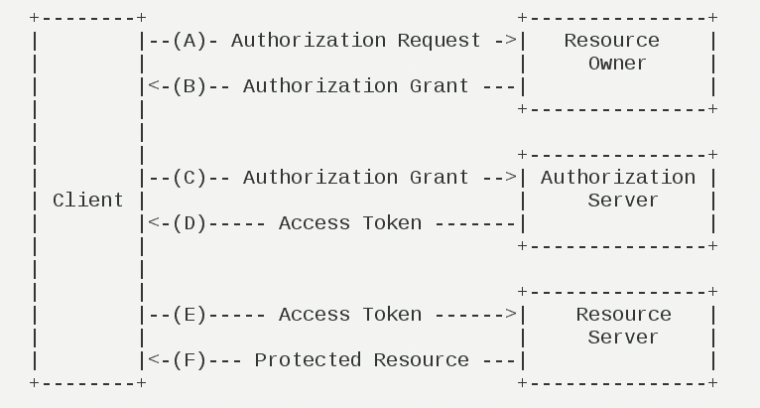
The operating flow of OAuth 2.0 is shown in the diagram below, taken from RFC 6749.

A. After the user opens the client, the client requests authorization from the user.
B. The user agrees to grant the client authorization.
C. The client uses the authorization obtained in the previous step to request a token from the authorization server.
D. The authorization server authenticates the client and, once everything checks out, agrees to issue a token.
E. The client uses the token to request resources from the resource server.
F. The resource server verifies the token and agrees to expose resources to the client.

It is easy to see that among these six steps, B is the key – i.e., how the user grants authorization to the client. With this authorization, the client can obtain a token, and then use that token to obtain resources.

The following sections explain the four authorization modes one by one.

5. Client Authorization Modes

The client must obtain the user’s authorization grant before it can receive an access token. OAuth 2.0 defines four authorization modes.

  • Authorization Code
  • Implicit
  • Resource Owner Password Credentials
  • Client Credentials

5.1. Authorization Code Mode

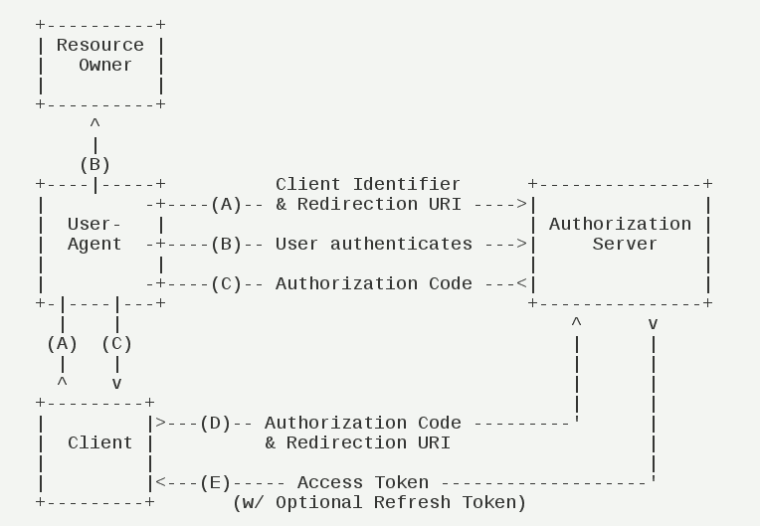
Authorization Code mode is the most feature-complete and rigorous of the authorization flows. Its defining characteristic is that the client’s back-end server interacts directly with the “service provider’s” authorization server.

A. The user accesses the client, which then redirects the user to the authorization server.
B. The user chooses whether to grant the client authorization.
C. Assuming the user grants authorization, the authorization server redirects the user to a “redirection URI” previously registered by the client, and includes an authorization code.
D. The client receives the authorization code and, together with the earlier “redirection URI”, requests a token from the authorization server. This step happens on the client’s back-end server and is invisible to the user.
E. The authorization server verifies the authorization code and the redirection URI, and once everything checks out, sends an access token and a refresh token to the client.

Below are the parameters required for each of these steps.

In step A, the URI the client uses to request authorization contains the following parameters:

  • response_type: indicates the authorization type, required; the value here is fixed as “code”.

  • client_id: the client ID, required.

  • redirect_uri: the redirection URI, optional.

  • scope: the scope of access being requested, optional.

  • state: the client’s current state; any value may be used, and the authorization server will return it verbatim.

1
2
GET /authorize?response_type=code&client_id=s6BhdRkqt3&state=xyz&redirect_uri=https%3A%2F%2Fclient%2Eexample%2Ecom%2Fcb HTTP/1.1
Host: server.example.com

In step C, the URI the server uses to respond to the client contains the following parameters:

  • code: the authorization code, required. The code should have a very short validity period, typically set to 10 minutes, and the client may use it only once; otherwise the authorization server will reject it. The code is bound one-to-one to the client ID and the redirection URI.

  • state: if the client’s request contained this parameter, the authorization server’s response must include it with exactly the same value.

1
2
HTTP/1.1 302 Found
Location: https://client.example.com/cb?code=SplxlOBeZQQYbYS6WxSbIA&state=xyz

In step D, the HTTP request the client sends to the authorization server to request a token contains the following parameters:

  • grant_type: indicates the authorization mode being used, required; the value here is fixed as “authorization_code”.

  • code: the authorization code obtained in the previous step, required.

  • redirect_uri: the redirection URI, required; it must match the value used in step A.

  • client_id: the client ID, required.

1
2
3
4
5
6
POST /token HTTP/1.1
Host: server.example.com
Authorization: Basic czZCaGRSa3F0MzpnWDFmQmF0M2JW
Content-Type: application/x-www-form-urlencoded

grant_type=authorization_code&code=SplxlOBeZQQYbYS6WxSbIA&redirect_uri=https%3A%2F%2Fclient%2Eexample%2Ecom%2Fcb

In step E, the HTTP response from the authorization server contains the following parameters:

  • access_token: the access token, required.

  • token_type: the token type, required; the value is case-insensitive and can be of type “bearer” or “mac”.

  • expires_in: the expiration time, in seconds. If omitted, the expiration time must be set through some other means.

  • refresh_token: the refresh token, used to obtain the next access token; optional.

  • scope: the scope of access; if it matches the scope requested by the client, this field may be omitted.

1
2
3
4
5
6
7
8
9
10
11
12
HTTP/1.1 200 OK
Content-Type: application/json;charset=UTF-8
Cache-Control: no-store
Pragma: no-cache

{
"access_token":"2YotnFZFEjr1zCsicMWpAA",
"token_type":"example",
"expires_in":3600,
"refresh_token":"tGzv3JOkF0XG5Qx2TlKWIA",
"example_parameter":"example_value"
}

As you can see from the code above, the relevant parameters are sent in JSON format (Content-Type: application/json). In addition, the HTTP headers explicitly specify that the response must not be cached.

5.2 Implicit Mode

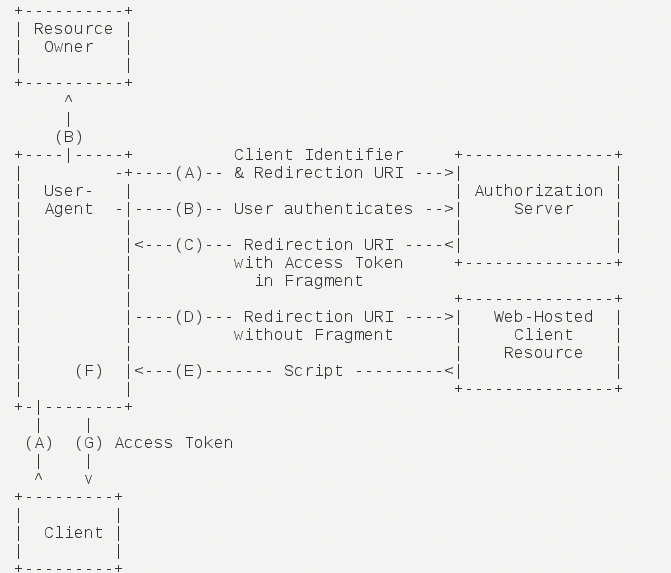
The Implicit grant type does not go through the third-party application’s server; instead, it requests a token directly from the authorization server in the browser, skipping the “authorization code” step – hence the name. All steps take place in the browser, the token is visible to the visitor, and the client does not need to be authenticated.

A. The client redirects the user to the authorization server.
B. The user decides whether to grant the client authorization.
C. Assuming the user grants authorization, the authorization server redirects the user to the “redirection URI” specified by the client and includes the access token in the fragment portion of the URI.
D. The browser sends a request to the resource server, without the fragment value received in the previous step.
E. The resource server returns a web page containing code that can extract the token from the fragment.
F. The browser executes the script obtained in the previous step and extracts the token.
G. The browser sends the token to the client.

Below are the parameters required for these steps.
In step A, the HTTP request sent by the client contains the following parameters:

  • response_type: indicates the authorization type; the value here is fixed as “token”, required.

  • client_id: the client ID, required.

  • redirect_uri: the redirection URI, optional.

  • scope: the scope of access, optional.

  • state: the client’s current state; any value may be used, and the authorization server will return it verbatim.

1
2
GET /authorize?response_type=token&client_id=s6BhdRkqt3&state=xyz&redirect_uri=https%3A%2F%2Fclient%2Eexample%2Ecom%2Fcb HTTP/1.1
Host: server.example.com

In step C, the URI the authorization server returns to the client contains the following parameters:

  • access_token: the access token, required.

  • token_type: the token type, required; the value is case-insensitive.

  • expires_in: the expiration time, in seconds. If omitted, the expiration time must be set through some other means.

  • scope: the scope of access; if it matches the scope requested by the client, this field may be omitted.

  • state: if the client’s request contained this parameter, the authorization server’s response must include it with exactly the same value.

1
2
HTTP/1.1 302 Found
Location: http://example.com/cb#access_token=2YotnFZFEjr1zCsicMWpAA&state=xyz&token_type=example&expires_in=3600

In the example above, the authorization server uses the Location field of the HTTP headers to specify the URL the browser should be redirected to. Note that the token is contained in the fragment portion of this URL.

Following step D, the browser next visits the URL specified by Location, but the fragment portion is not sent. In step E, the code served by the service provider’s resource server extracts the token from the fragment.

5.3 Password Mode

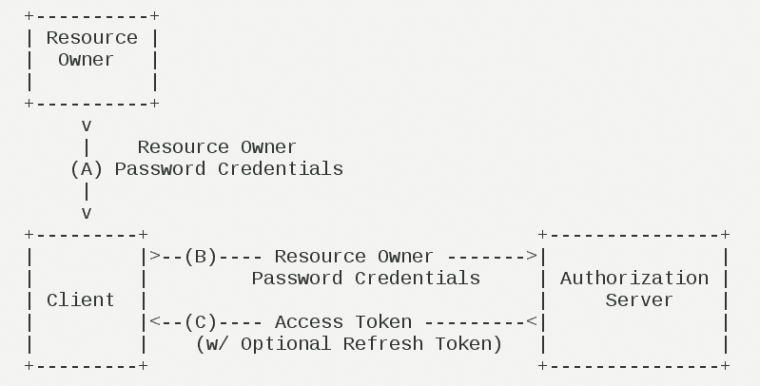
In Password mode (Resource Owner Password Credentials Grant), the user provides their username and password directly to the client. The client uses this information to request authorization from the “service provider”.

In this mode, the user must hand their password to the client, but the client must not store the password. This is typically used in situations where the user has a high degree of trust in the client – for example, when the client is part of the operating system or is produced by a well-known company. The authorization server should only consider this mode when the other authorization modes cannot be used.

A. The user provides their username and password to the client.
B. The client sends the username and password to the authorization server, requesting a token from it.
C. The authorization server verifies everything and, once it checks out, provides the client with an access token.

In step B, the HTTP request sent by the client contains the following parameters:

  • grant_type: indicates the authorization type; the value here is fixed as “password”, required.

  • username: the username, required.

  • password: the user’s password, required.

  • scope: the scope of access, optional.

1
2
3
4
5
6
POST /token HTTP/1.1
Host: server.example.com
Authorization: Basic czZCaGRSa3F0MzpnWDFmQmF0M2JW
Content-Type: application/x-www-form-urlencoded

grant_type=password&username=johndoe&password=A3ddj3w

In step C, the authorization server sends the access token to the client. Here is an example.

1
2
3
4
5
6
7
8
9
10
11
12
HTTP/1.1 200 OK
Content-Type: application/json;charset=UTF-8
Cache-Control: no-store
Pragma: no-cache

{
"access_token":"2YotnFZFEjr1zCsicMWpAA",
"token_type":"example",
"expires_in":3600,
"refresh_token":"tGzv3JOkF0XG5Qx2TlKWIA",
"example_parameter":"example_value"
}

For the meaning of each parameter in the code above, see the “Authorization Code Mode” section.

Throughout the entire process, the client must not save the user’s password.

5.4 Client Credentials Mode

In Client Credentials mode, the client authenticates with the “service provider” on its own behalf, rather than on behalf of the user. Strictly speaking, Client Credentials mode does not fall under the problem the OAuth framework is designed to solve. In this mode, the user registers directly with the client, and the client requests services from the “service provider” in its own name – there is really no authorization problem to speak of.

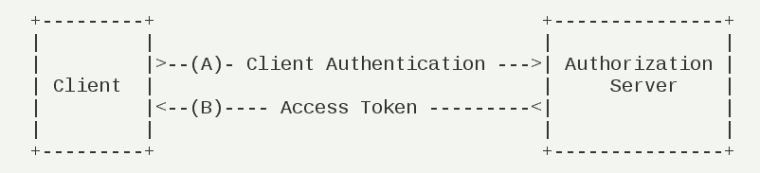
A. The client authenticates itself with the authorization server and requests an access token.
B. The authorization server verifies everything and, once it checks out, provides the client with an access token.

In step A, the HTTP request sent by the client contains the following parameters:

  • granttype: indicates the authorization type; the value here is fixed as “clientcredentials”, required.

  • scope: the scope of access, optional.

1
2
3
4
5
6
POST /token HTTP/1.1
Host: server.example.com
Authorization: Basic czZCaGRSa3F0MzpnWDFmQmF0M2JW
Content-Type: application/x-www-form-urlencoded

grant_type=client_credentials

The authorization server must verify the client’s identity in some way.

In step B, the authorization server sends the access token to the client. Here is an example.

1
2
3
4
5
6
7
8
9
10
11
HTTP/1.1 200 OK
Content-Type: application/json;charset=UTF-8
Cache-Control: no-store
Pragma: no-cache

{
"access_token":"2YotnFZFEjr1zCsicMWpAA",
"token_type":"example",
"expires_in":3600,
"example_parameter":"example_value"
}

For the meaning of each parameter in the code above, see the “Authorization Code Mode” section.

5.5 Refreshing the Token

If, when the user tries to access the service, the client’s “access token” has already expired, the client must use a “refresh token” to request a new access token.

The HTTP request the client sends to refresh the token contains the following parameters:

  • granttype: indicates the authorization mode being used; the value here is fixed as “refreshtoken”, required.

  • refresh_token: the refresh token received earlier, required.

  • scope: the scope of access being requested; it must not exceed the scope of the previous request. If this parameter is omitted, the scope is treated as identical to the previous one.

1
2
3
4
5
6
POST /token HTTP/1.1
Host: server.example.com
Authorization: Basic czZCaGRSa3F0MzpnWDFmQmF0M2JW
Content-Type: application/x-www-form-urlencoded

grant_type=refresh_token&refresh_token=tGzv3JOkF0XG5Qx2TlKWIA

Source: http://www.ruanyifeng.com/blog/2014/05/oauth_2_0.html